• Skip to primary navigation
  • Skip to main content
  • Skip to primary sidebar

Clever Homeschool

Fun courses based on your child's interests!

  • Home
  • Free Photo Lessons for Kids
  • “Get That Shot!” photo tags

Teach Your Child To Take a Silhouette Picture

November 23, 2015 by Jason Huskey 3 Comments

In this lesson we are going to see how your camera can be tricked into taking a silhouette picture. Sometimes tricking your camera can turn out to be a very good thing. A silhouette is when a person or thing is very dark in your picture. The background on the other hand should be bright.

Silhouettes create mystery and allow the viewer to use their imagination to complete the picture.

bea represa - silhouette
“Silhouette” by Bea Represa CC BY 2.0

Step 1 – Find an Interesting Subject

You cannot use the subject’s colors or textures to make the photo pleasing so you have to rely on its shape. Look for subjects that are recognizable by shape alone.

In the photo above you can tell that the main subject is a person jumping. You may also recognize the buildings in the background. Scroll down to find out where these buildings are located.

Alex France - Big Ben + Houses of Parliament CC BY SA 2.0
“Big Ben + Houses of Parliament” by Alex France CC BY-SA 2.0

If you guessed the British Houses of Parliament and The Clock Tower that houses Big Ben in London you were right. Here is a picture during the day.

Pick one of these subjects for a silhouette photo:

• Family members
• Friends
• Toys
• Buildings
• Animals
• Your bicycle

ashley campbell - silhouette
“Silhouette” by Ashley Campbell CC BY 2.0

If you are taking a silhouette of a person have them stand sideways to the camera. This way you will be able to see their eyelashes, nose, and lips. You can probably recognize your family members by looking at the profile of their face. If they are looking straight into the camera you will lose all the detail in their face.

Step 2 – Turn Off Your Flash

The flash will light up your subject which is not the effect we are looking for. Instead have your parents help you turn off the flash on your camera.

If your camera does not allow you to turn off the flash in Auto mode try switching to Program mode. This is the big “P” on your mode dial.

Step 3 – Put Your Subject in Front of a Bright Background

A sunset or sunrise is best for this. See how the flower below is placed right in front of the sunset.

chad cooper - shoreline silhouette
“Shoreline Silhouette” by Chad Cooper CC BY 2.0

You can also use window light as shown in the picture of the toy soldiers below. Find the brightest window in your house. Then create an action scene by setting up some toys on the window sill.

kyle may - toy soldiers(silhouette)
“Toy Soldiers” by Kyle May CC BY 2.0

Step 4 – Trick Your Camera

We must make the camera think that the background is the most important part of this picture.

Use Auto Mode

Your camera takes a meter reading of the light when you press the shutter halfway down. Therefore you can point your camera at the brightest part of the picture and press the shutter halfway down and hold it.

While still holding the shutter halfway down move your camera back to frame your subject where you want it. Finally, press the shutter button all the way down to take the picture.

Some cameras have an AEL button on the back. This stands for Auto Exposure Lock. Instead of pressing the shutter halfway down you can hold down the AEL button instead.

Use Manual Mode

If you are having trouble tricking your camera you might have to switch to manual mode. Turn your mode dial to M. This means you are now in complete control of how light or dark your subject is. Start with these camera settings:
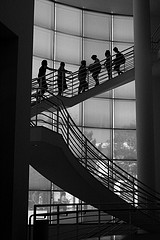
randy robertson staircase silhouette
“Staircase Silhouette” by Randy Robertson CC BY 2.0
  • Exposure Mode: Manual (M)
  • Aperture: 8
  • Shutter Speed: 250
  • ISO: 100

Take the picture and then review it on the LCD screen.

  • If your subject is not dark enough increase your shutter speed to 500 and try again.
  • If your picture is too dark decrease the shutter speed to 125 and try again.

Keep experimenting with different shutter speeds until you get the picture just right.

Review

  1. Find an interesting subject
  2. Turn off your flash
  3. Put your subject in front of a bright background
  4. Trick your camera
edmund garman kaanapali silhouette 2
“Kaanapali Silhouette” by Edmund Garman CC BY 2.0

Photo Assignment

Take a silhouette picture

Click the link above for a printable photo assignment worksheet.

Share Your Thoughts:  What photo techniques do your kids want to learn next?

Filed Under: Photography

Reader Interactions

Comments

  1. Stacy says

    December 22, 2015 at 4:25 pm

    Love these! Do you have any lessons on white balance and post processing for kids?

    Reply
    • Jason Huskey says

      December 22, 2015 at 6:42 pm

      White balance is a great idea for a lesson, I’ll get to work on that. Also, I have thought about writing lessons on post processing using GIMP. This is a free photo editor that is comparable to Photoshop. Would you like to see lessons using GIMP?

      Reply
      • Stacy says

        February 5, 2016 at 9:44 pm

        I have Photoshop and Lightroom, but I would be interested in teaching my children with any post processing resources. 🙂 We are excited to start with the 16 lessons you have so far. They look great!

        Reply

Leave a Reply Cancel reply

Your email address will not be published. Required fields are marked *

Primary Sidebar

Free Photo Lessons for Kids

Photo Lessons for kids

Categories

  • Photography
  • Preschool
  • Reading
  • Uncategorized
A parent and child working together at a table with books and a laptop in a bright room, with a bulletin board displaying charts and papers in the background.

How To Align Your Homeschool Curriculum With State Standards

What "Aligned To Standards" Actually Means At Home Standards alignment in homeschooling is not … [Read More...] about How To Align Your Homeschool Curriculum With State Standards

A parent and child working together on a homeschool lesson using a tablet with AI assistance in a bright study area.

Using AI To Enhance Your Homeschool Curriculum With ChatGPT

Build Customized Lessons With ChatGPT First ChatGPT can help you build a homeschool curriculum that … [Read More...] about Using AI To Enhance Your Homeschool Curriculum With ChatGPT

A group of children and adults of different ages working together around a table with educational materials in a bright learning space.

Family-Style Curriculums For Teaching Multiple Ages At Once

What Makes A Curriculum Work Across Multiple Ages A strong family-style homeschool curriculum saves … [Read More...] about Family-Style Curriculums For Teaching Multiple Ages At Once

A group of young people using digital devices surrounded by symbols of coding and computer science in a modern learning environment.

Coding And Computer Science: Best Curriculums Reviewed

How To Choose The Right Learning Path First Your child's age, current skill level, and long-term … [Read More...] about Coding And Computer Science: Best Curriculums Reviewed

Students gathered around a large world map and storybooks, exploring different world cultures together in a classroom.

Geography Without A Textbook: Stories And Maps

Build A Story-First Geography Plan The best geography lessons feel like travel, not homework. When … [Read More...] about Geography Without A Textbook: Stories And Maps

A parent and child studying together at a well-lit home workspace filled with educational materials, showing a supportive and focused learning moment.

10 Signs Homeschooling Is Working for Your Family

Academic Progress Feels More Personalized And Effective When homeschooling clicks, academic growth … [Read More...] about 10 Signs Homeschooling Is Working for Your Family

A parent and child sitting at a table in a cozy room, using a laptop and tablet surrounded by books and educational items.

Best Homeschool Podcasts Worth Listening To in 2026

Top Picks By Homeschool Need The best homeschool podcasts in 2026 cover everything from first-year … [Read More...] about Best Homeschool Podcasts Worth Listening To in 2026

A family of four sitting around a table looking at brochures and calendars, planning an educational event together in a cozy living room.

Top Homeschool Conferences Worth Attending in 2026

How To Choose The Right Event For Your Family Finding the right homeschool conference depends on … [Read More...] about Top Homeschool Conferences Worth Attending in 2026

A person organizing binders, bookshelves, and storage boxes in a tidy workspace dedicated to managing physical curriculum materials.

How To Organize Your Physical Curriculum: Smart Storage

Sort What Stays, Moves, Or Goes Before you buy a single bin or binder, you need to make honest … [Read More...] about How To Organize Your Physical Curriculum: Smart Storage

An educator reviewing documents and checking a checklist at a desk with educational materials and a calendar marked every 9 weeks.

Curriculum Audit: A 9-Week Review Process

What To Check Every 9 Weeks A meaningful curriculum audit starts with knowing exactly what you're … [Read More...] about Curriculum Audit: A 9-Week Review Process