• Skip to primary navigation
  • Skip to main content
  • Skip to primary sidebar

Clever Homeschool

Fun courses based on your child's interests!

  • Home
  • Free Photo Lessons for Kids
  • “Get That Shot!” photo tags

Teach Your Child to use the Camera’s Auto Modes

May 30, 2015 by Jason Huskey Leave a Comment

A young child should not be burdened with the task of figuring out how to make the best exposure. For kids under 7 just let them use the automatic modes. You may hear advice to never use the auto modes but don’t let this bother you.

If your child enjoys taking pictures just let them be creative. See where their imagination takes them. That being said, you can help your child start to understand a little more about camera settings by choosing different modes for them.

I will explain the different auto modes available on most cameras. Don’t be afraid to experiment with them.
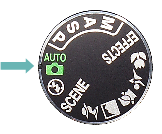
auto modeAuto Mode

Your camera will make all the decisions in this mode. This is the best place to start for most beginners. The only thing you need to think about is finding a great subject and composing for an interesting picture.
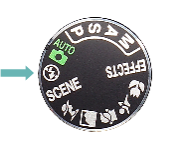
 auto flash off modeAuto Flash Off Mode

This mode is the same as Auto except it turns off the flash. Your camera’s built-in flash generally creates unflattering light and shadows on your subjects. Use this mode when possible instead of Auto mode.
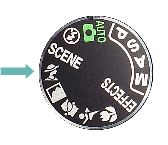
portrait modePortrait Mode

When taking pictures of people, this mode will tell the camera to blur the background. Messy backgrounds are often the cause of bad pictures. The camera will also soften the skin tones while sharpening other parts of your subject. Overall this creates a more pleasing portrait. All you have to do is compose and shoot.
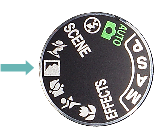
landscape modeLandscape Mode

This mode will make colors more vivid. It will also set your lens to a small aperture so that more of the scene is in focus.
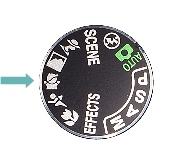
 

child modeChild Mode

Clothing colors will be more vibrant here while skin tones will be soft and flattering. Don’t expect this mode to always stop the action of a fast toddler though. In low light situations you will probably see some blur. Ironically this may not be the best mode for taking pictures of children. Instead, try out sports mode.
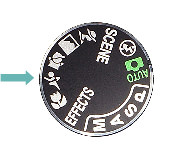
sports modeSports Mode

When shooting sports we usually want to freeze the action. This requires a fast shutter speed and that is exactly what Sports Mode will do for you. Flash will also be set to off.

 

close up modeClose-up Mode

Do not confuse this with a Macro mode available on some fixed lens cameras. Close-up Mode sets a small aperture so that more of your picture is in focus. In technical terms this creates a larger depth-of-field. This mode will not make your lens focus any closer than normal.

If you have a fixed lens camera with Macro mode it will also be designated with a flower. Turn Macro Mode on to allow your lens to focus much closer. Both modes are designed to take close-up pictures of your subject.

The beginning of understanding

As your child picks different subjects help them select the correct mode to get the best results. They will begin to understand that there is more to photography than just pressing the shutter button. They can learn all about the manual modes when they are ready. Don’t rush it.

Leave a comment and let me know what mode you shoot with the most and why!

Filed Under: Photography

Reader Interactions

Leave a Reply Cancel reply

Your email address will not be published. Required fields are marked *

Primary Sidebar

Free Photo Lessons for Kids

Photo Lessons for kids

Categories

  • Photography
  • Preschool
  • Reading
  • Uncategorized
A parent and child working together at a table with books and a laptop in a bright room, with a bulletin board displaying charts and papers in the background.

How To Align Your Homeschool Curriculum With State Standards

What "Aligned To Standards" Actually Means At Home Standards alignment in homeschooling is not … [Read More...] about How To Align Your Homeschool Curriculum With State Standards

A parent and child working together on a homeschool lesson using a tablet with AI assistance in a bright study area.

Using AI To Enhance Your Homeschool Curriculum With ChatGPT

Build Customized Lessons With ChatGPT First ChatGPT can help you build a homeschool curriculum that … [Read More...] about Using AI To Enhance Your Homeschool Curriculum With ChatGPT

A group of children and adults of different ages working together around a table with educational materials in a bright learning space.

Family-Style Curriculums For Teaching Multiple Ages At Once

What Makes A Curriculum Work Across Multiple Ages A strong family-style homeschool curriculum saves … [Read More...] about Family-Style Curriculums For Teaching Multiple Ages At Once

A group of young people using digital devices surrounded by symbols of coding and computer science in a modern learning environment.

Coding And Computer Science: Best Curriculums Reviewed

How To Choose The Right Learning Path First Your child's age, current skill level, and long-term … [Read More...] about Coding And Computer Science: Best Curriculums Reviewed

Students gathered around a large world map and storybooks, exploring different world cultures together in a classroom.

Geography Without A Textbook: Stories And Maps

Build A Story-First Geography Plan The best geography lessons feel like travel, not homework. When … [Read More...] about Geography Without A Textbook: Stories And Maps

A parent and child studying together at a well-lit home workspace filled with educational materials, showing a supportive and focused learning moment.

10 Signs Homeschooling Is Working for Your Family

Academic Progress Feels More Personalized And Effective When homeschooling clicks, academic growth … [Read More...] about 10 Signs Homeschooling Is Working for Your Family

A parent and child sitting at a table in a cozy room, using a laptop and tablet surrounded by books and educational items.

Best Homeschool Podcasts Worth Listening To in 2026

Top Picks By Homeschool Need The best homeschool podcasts in 2026 cover everything from first-year … [Read More...] about Best Homeschool Podcasts Worth Listening To in 2026

A family of four sitting around a table looking at brochures and calendars, planning an educational event together in a cozy living room.

Top Homeschool Conferences Worth Attending in 2026

How To Choose The Right Event For Your Family Finding the right homeschool conference depends on … [Read More...] about Top Homeschool Conferences Worth Attending in 2026

A person organizing binders, bookshelves, and storage boxes in a tidy workspace dedicated to managing physical curriculum materials.

How To Organize Your Physical Curriculum: Smart Storage

Sort What Stays, Moves, Or Goes Before you buy a single bin or binder, you need to make honest … [Read More...] about How To Organize Your Physical Curriculum: Smart Storage

An educator reviewing documents and checking a checklist at a desk with educational materials and a calendar marked every 9 weeks.

Curriculum Audit: A 9-Week Review Process

What To Check Every 9 Weeks A meaningful curriculum audit starts with knowing exactly what you're … [Read More...] about Curriculum Audit: A 9-Week Review Process